A decision guide for smaller education teams
Do I Need School ERP Software Just to Generate Report Cards from Excel?
No, not necessarily. If your only problem is turning final student data that is already in Excel into individual report-card PDFs, buying or implementing a full school ERP for that task alone may be more system than you need. A reusable report-card template and a focused document-generation workflow can be sufficient.
That answer changes when the school needs one connected system for attendance, fees, admissions, timetables, portals, communication and academic records across years. Those are ERP problems, not PDF-formatting problems. The sensible choice depends on the operational scope, not simply the number of report cards. DataToPDF does not replace school ERP software.
What problem are you actually trying to solve?
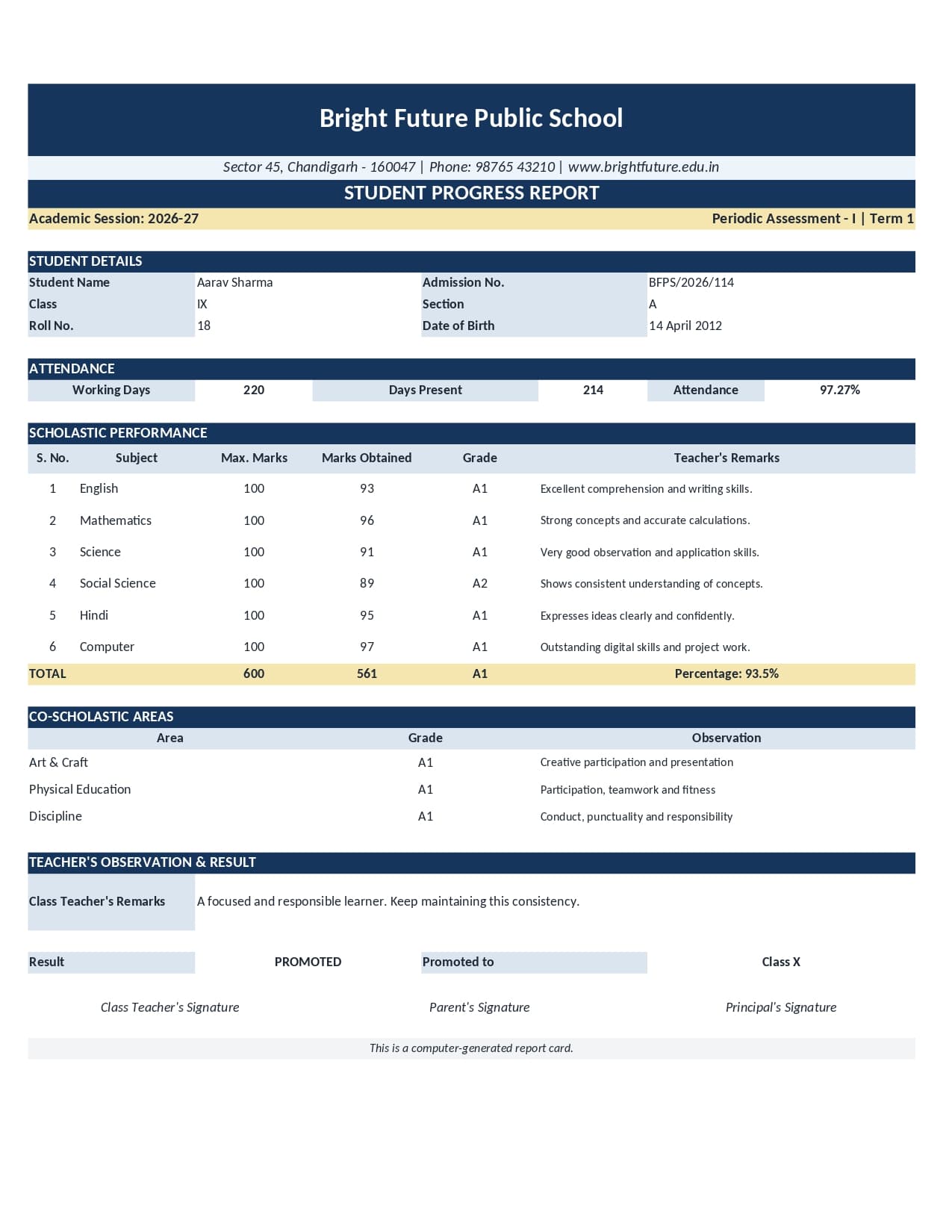
“We need report cards” can describe two very different situations. In the first, teachers have completed the marks, totals, percentages, grades and remarks. The administrator has a reviewed spreadsheet and an approved design. The remaining work is document production: place the correct row into the layout, create one PDF per student, name the files and review the batch.
In the second situation, the school does not have a reliable student list, teachers enter marks in separate places, attendance is disconnected, fee records sit with another department and parents need logins. Producing a PDF addresses only the last few metres of that process. The larger issue is operational data and workflow across the institution.
Choosing between these options is therefore not a contest between a small tool and a large tool. It is a scope decision. Use the smallest system that responsibly handles the real requirement, but do not ask a document generator to perform school-management work it was never designed to do.
When is Excel plus a reusable template enough?
A focused workflow may be a good fit when all of the following are substantially true:
- Marks and other report values already exist in a final Excel or CSV file.
- Authorised staff have calculated and checked totals, percentages, grades and results.
- The school or centre already has an approved report-card design.
- Students in the batch use the same compatible field structure.
- The required output is a separate, reviewed PDF for each student.
- The organisation already has its own process for storage and distribution.
- There is no need to collect attendance, fees or marks inside the same tool.
- Staff can prepare, preview and reconcile controlled class batches.
This situation is common in a small school, coaching institute, tuition centre or training centre that already maintains its academic results in spreadsheets. It may also suit a school that has another source system but exports final approved data for a particular document run.
To understand the narrower class workflow, see how an administrator can turn prepared rows intoseparate, correctly named report card PDFs.
What is the simplest workflow when marks are already prepared?
- 1. Approve the source data. Check student identities, marks, calculations, grades and remarks in the school’s normal academic process.
- 2. Match the template. Keep one student per row and connect each changing report-card field to the corresponding spreadsheet heading.
- 3. Preview edge cases. Test long names, longer remarks, blanks and different result statuses before processing the batch.
- 4. Generate and review. Create the individual files, reconcile the output count and use the organisation’s approved storage and distribution process.
When would a school ERP actually be better?
An ERP becomes more relevant when the school wants connected processes rather than a single output. The specific modules vary by vendor, but the requirement may include a central student database, admissions, attendance, fee management, teacher and parent portals, timetables, communications, academic records over several years and approvals that cross departments.
For example, a growing school may want a teacher to enter marks, a coordinator to approve them, an attendance value to be pulled from daily records, and parents to view results in a portal. That is an integrated workflow. Maintaining separate spreadsheets and manually coordinating those stages may create more risk than it removes.
ERP evaluation still requires care. Schools should compare data ownership, permissions, implementation work, training, support, exports, privacy, recurring cost and the actual modules they will use. This article does not recommend a specific ERP; it explains why its broader scope may be justified.
A practical sign that the lighter approach is being outgrown is that staff spend more effort reconciling separate files than reviewing results. Repeated duplicate records, unclear approval ownership, incompatible campus files and requests for live parent access all point to a broader systems problem rather than a document-output problem.
How do the two approaches differ?
| Question | Spreadsheet + template workflow | School ERP |
|---|---|---|
| Primary purpose | Turn final rows into personalised PDFs | Manage connected school operations and records |
| Student database | Not provided | Common core function |
| Marks preparation | Completed and checked before upload | May support entry and workflows, depending on the ERP |
| Attendance and fees | Can display supplied values only | Often managed as operational modules |
| Parent or teacher portal | Not provided | Often available, depending on the ERP |
| Academic history | Not maintained | Often retained across terms or years |
| Document output | Focused on personalised PDFs from prepared data | One part of a broader system |
ERP products differ. The table compares typical scope, not a guarantee about every system.
What does the lightweight workflow still require from staff?
Lightweight does not mean responsibility-free. Someone must control the spreadsheet structure, use the correct template, confirm that every intended student has one row, resolve blanks, preview difficult records, check filenames and review the final output. The organisation also needs an appropriate way to store and distribute confidential student documents.
DataToPDF takes user-prepared Excel or CSV data and a reusable Word or Excel template and generates personalised PDFs. It does not calculate marks or percentages, assign grades, decide pass or fail, evaluate performance, write remarks, verify records, maintain academic history, operate a student database or send reports to parents.
The user remains responsible for names, roll numbers, marks, totals, percentages, grades, remarks, attendance, promotion status, teacher comments, school details and all other academic data. A PDF that looks complete is not proof that its source values were correct.
Three realistic decisions
A 180-student local school with final Excel marks
The school needs term PDFs, already has an approved design and does not need portals or integrated fees. A focused generation workflow may address the immediate problem, provided staff maintain proper academic and distribution checks. Thesmall-school report-card guide explains that operational preparation in more detail.
A tuition centre sending monthly progress updates
If tutors approve the remarks and attendance values in Excel and the centre only needs individual PDFs, a reusable template may be sufficient. If it also needs live attendance, billing, parent accounts and learning records, a management platform deserves consideration.
A growing multi-campus school group
When branches need shared student identities, central permissions, cross-year histories, attendance and fee data, separate spreadsheet batches may become difficult to govern. An ERP or another integrated school system is more likely to match the organisation’s true scope.
A decision checklist before buying or building anything
- 1. List the required outcomes. Is the need PDFs only, or a connected administrative workflow?
- 2. Identify the source of truth. Where are student identities, marks, attendance and approvals maintained?
- 3. Separate present needs from future wishes. Do not pay for unused scope, but do not ignore near-term growth.
- 4. Assign responsibility. Decide who prepares, approves, generates, reviews, stores and distributes results.
- 5. Test the real workflow. Use representative classes, corrections and edge cases rather than evaluating only a perfect sample.
So, which option should I choose?
If your problem is only converting already-prepared student data into personalised report-card PDFs, a full ERP may be more than you need. A controlled spreadsheet-and-template workflow can keep that task focused.
If the school needs end-to-end student administration, connected departmental workflows, portals or long-term records, an ERP may be the better tool. DataToPDF should not be presented as its replacement. You can review the supported document-generation scope on theReport Card Generator from Excel page.
Frequently asked questions
Do I need school ERP software only to make report card PDFs?
Not necessarily. If final student data already exists in Excel and the requirement is limited to personalised report-card PDFs, a focused spreadsheet-and-template workflow may be enough.
When is an ERP a better choice?
An ERP is usually more suitable when the organisation needs connected student records, attendance, fees, admissions, portals, timetables, communication or academic history across departments and years.
Does DataToPDF replace a school ERP?
No. DataToPDF generates personalised PDFs from prepared Excel or CSV data and a reusable template. It is not a student database or an end-to-end school administration system.
Can a document workflow manage attendance or fees?
No. A prepared attendance value can appear in a report, but DataToPDF does not record attendance, collect fees or manage those processes. An ERP or another management system is more appropriate when those records need to be connected and maintained.
When has a school outgrown a lightweight report-card workflow?
Consider a broader system when separate files are difficult to control or the school needs shared records, role-based approvals, attendance, fees, portals, cross-year history or coordinated work across departments and campuses.