Manual salary slip errors
A wrong earning, deduction, net pay or bank detail can create confusion and reduce employee trust.
Excel / CSV Payroll Data → Employee Salary Slip PDFs
Download a professional salary slip template and generate employee salary slips from Excel or CSV. Add employee details, earnings, deductions, attendance summary and net pay, then create bulk PDF salary slips with DataToPDF.
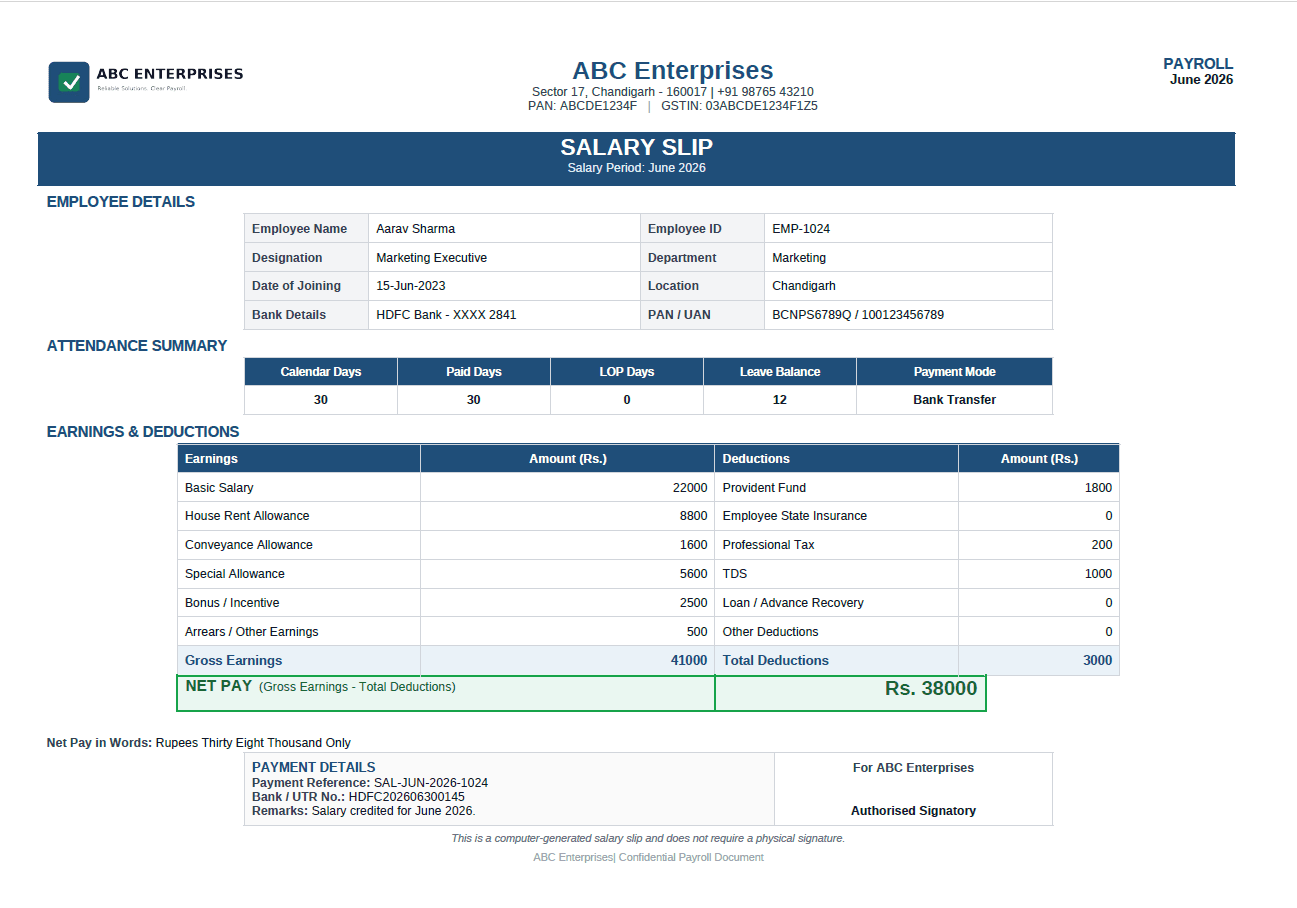
Prepare and verify every payroll value before upload. DataToPDF uses your spreadsheet data and template to generate salary-slip PDFs; it does not calculate payroll, salary, PF, ESI, TDS, tax, deductions, attendance or leave values.
Quick answer
Prepare an Excel or CSV file with one row per employee. Add columns for employee details, earnings, deductions, attendance, payment mode and net pay. Then use a salary slip template with variables like {{Employee_Name}}, {{Basic_Salary}}, {{Total_Deductions}} and {{Net_Pay}}. DataToPDF replaces the variables and creates individual PDF salary slips.
The problem
Many companies already maintain salary data in Excel. But if HR, accounts or admin teams still create salary slips one by one, payroll becomes slow, repetitive and error-prone.
A wrong earning, deduction, net pay or bank detail can create confusion and reduce employee trust.
Every month, teams spend hours copying payroll data, saving PDFs and renaming files employee-wise.
A clean salary slip with company branding, salary breakup and payment details presents the organisation as more reliable.
Manual method
Manual salary slip creation usually means maintaining one Excel file for payroll, then editing a salary slip format individually for every employee.
Better solution
DataToPDF lets you keep all payroll values in Excel and all design in one salary slip template. It combines both files and generates personalised salary slip PDFs automatically.
One employee row = one personalised salary slip PDF.
Use employee details, earnings, deductions and net pay.
Keep your company logo, payroll format and signatory area.
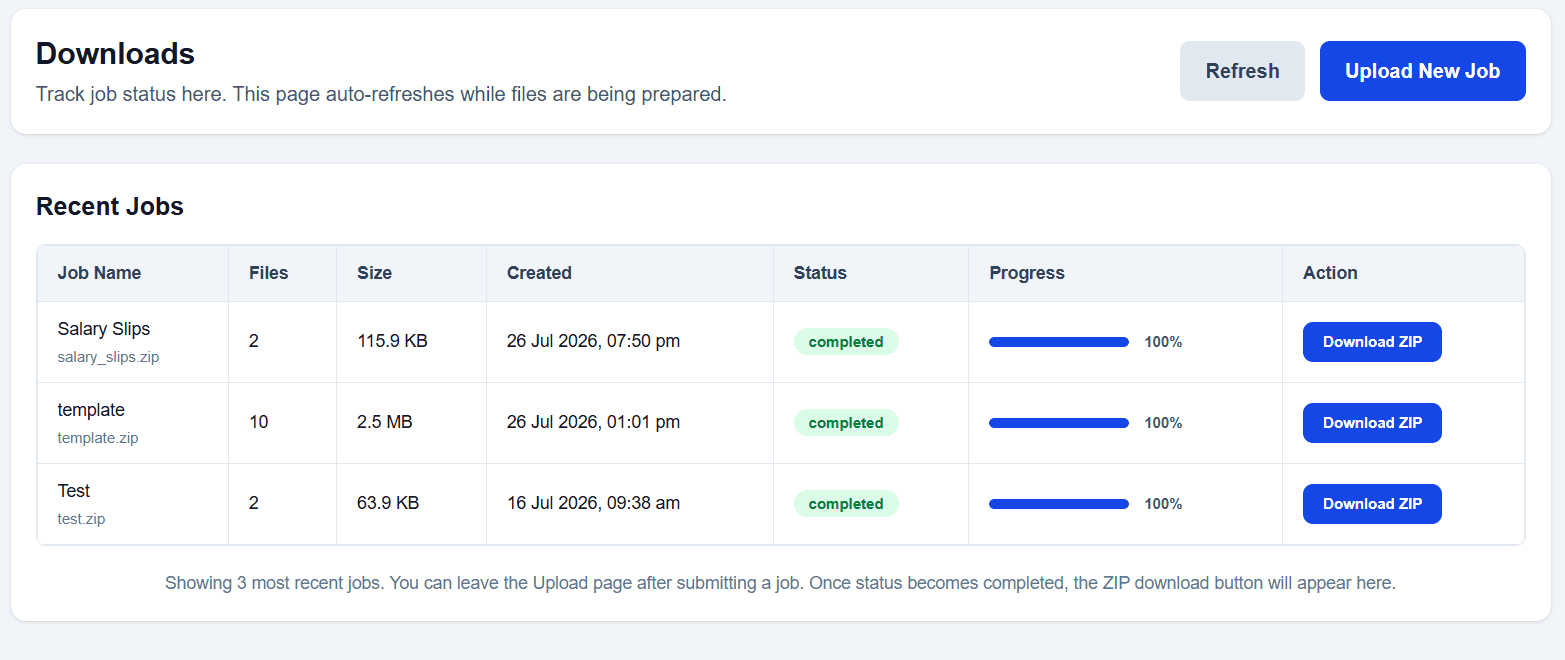
Download all salary slips together in one ZIP file.
Step-by-step guide
Use this workflow every month to create employee salary slips from payroll data without copy-paste work.
Create one row for each employee. Add salary month, employee details, earnings, deductions, attendance summary and payment reference details.

Download the salary slip template and keep variables such as {{Employee_Name}}, {{Basic_Salary}}, {{Gross_Earnings}}, {{Total_Deductions}} and {{Net_Pay}}.
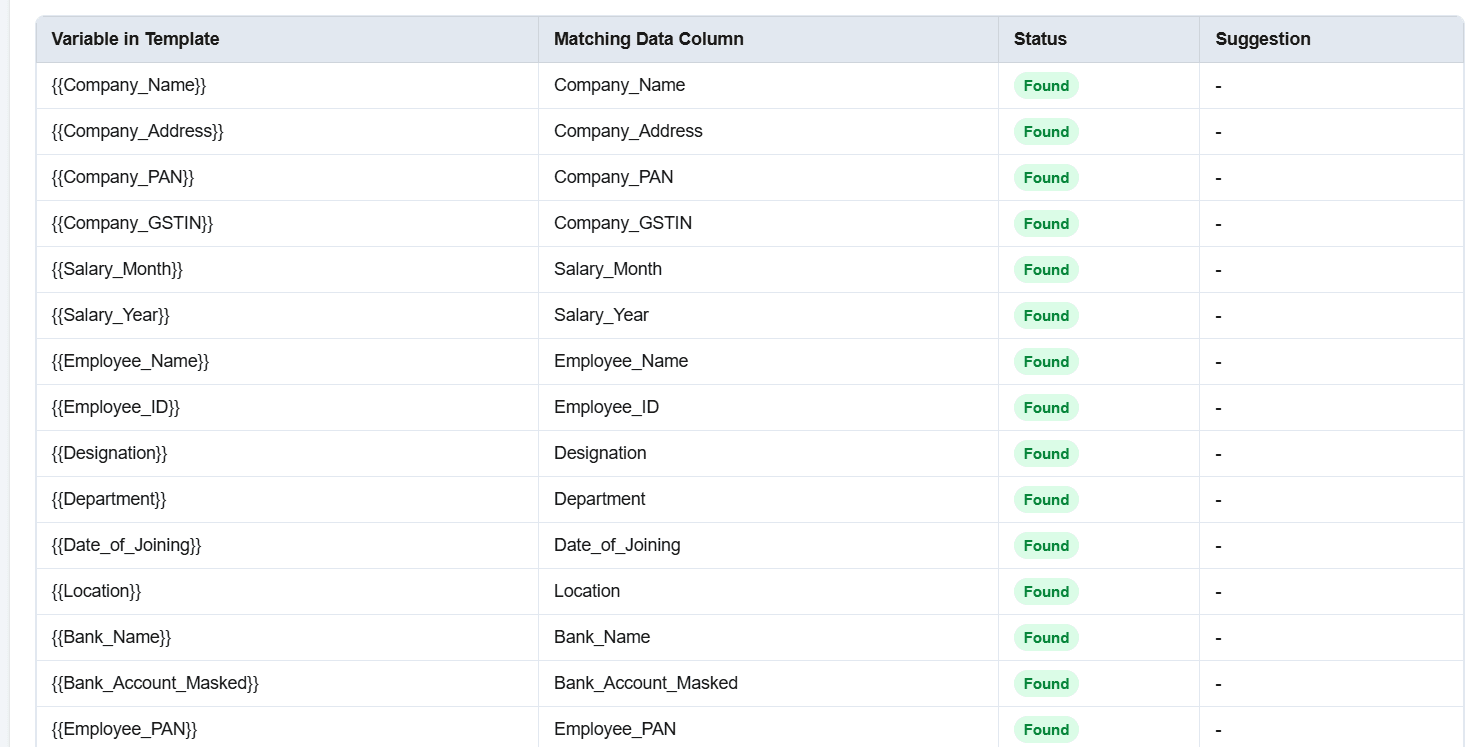
Upload your Excel or CSV payroll data and your salary slip template to DataToPDF.
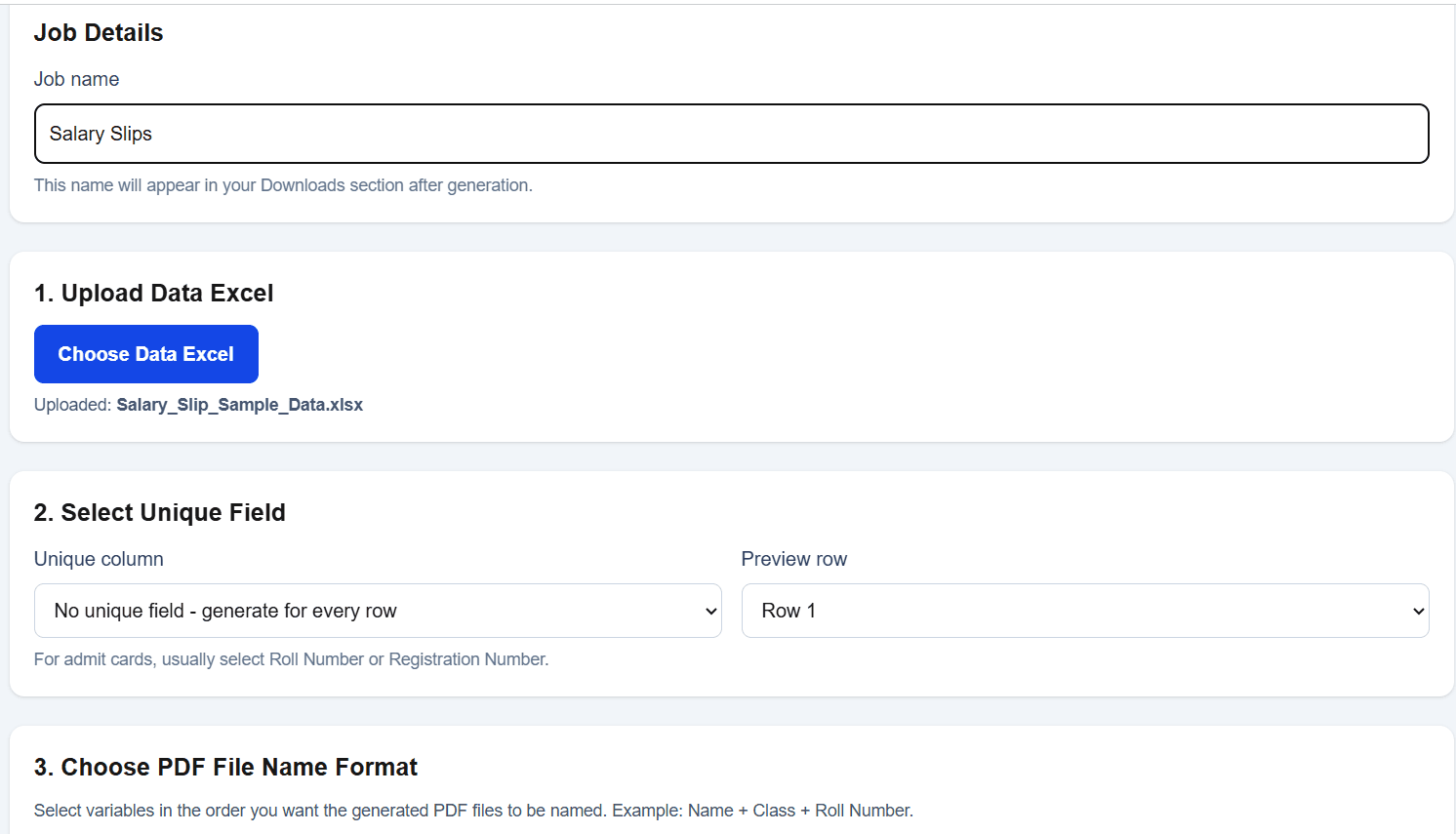
DataToPDF replaces the variables with employee payroll data and creates one salary slip PDF for every row.
Download all generated salary slips together in one ZIP file. You can name files using employee name, employee ID, month or year.
Downloadable template
The template format includes company details, payroll month, employee details, attendance summary, earnings, deductions, net pay, payment details and authorised signatory space.
Company_NameCompany_AddressCompany_PANCompany_GSTINSalary_MonthSalary_YearEmployee_NameEmployee_IDDesignationDepartmentDate_of_JoiningLocationBank_NameBank_Account_MaskedEmployee_PANUANCalendar_DaysPaid_DaysLOP_DaysLeave_BalancePayment_ModeBasic_SalaryHRAConveyance_AllowanceSpecial_AllowanceBonus_IncentiveOther_EarningsPF_DeductionESI_DeductionProfessional_TaxTDS_DeductionLoan_RecoveryOther_DeductionsGross_EarningsTotal_DeductionsNet_PayNet_Pay_WordsPayment_ReferenceUTR_NoRemarks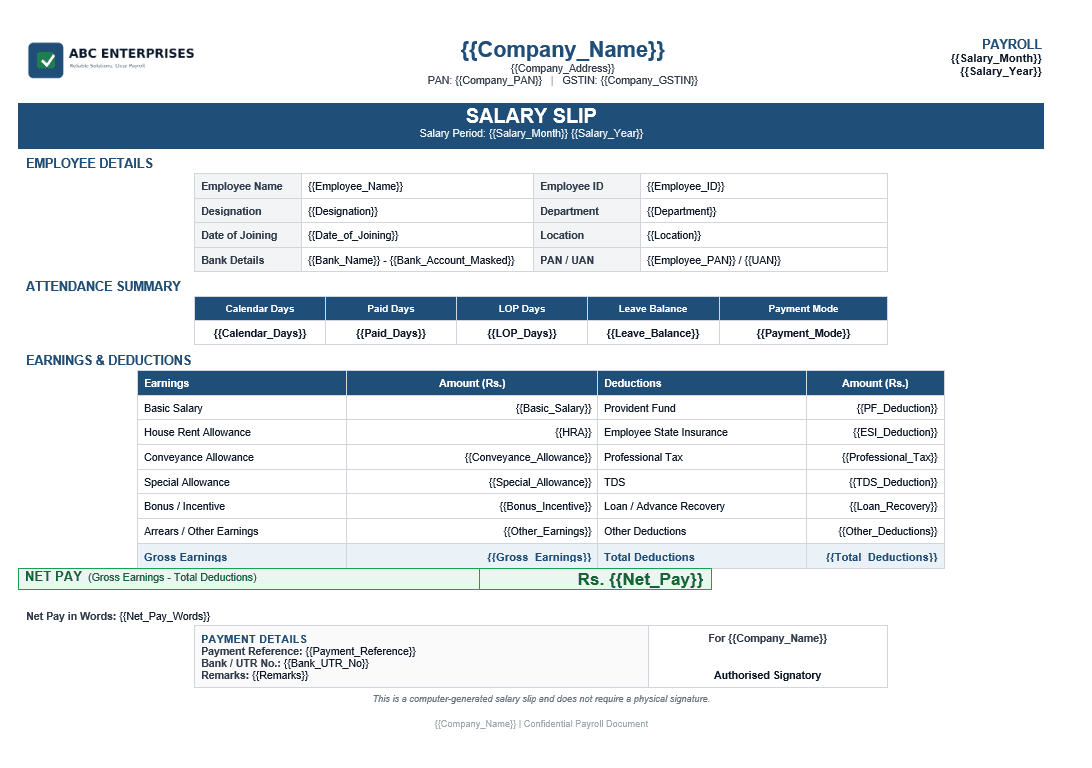
Template sections
The format is made to look clean and official while keeping the payroll details easy to read.
Use cases
Any organisation that maintains payroll data in Excel can use this page to download the template and create professional salary slip PDFs.
Generate monthly salary slips for employees without manually editing each payroll document.
Create professional payslip PDFs with employee details, earnings, deductions, attendance and net pay.
Prepare salary slips for multiple clients using Excel payroll data and reusable templates.
Create staff salary slips for teachers, admin staff, sales teams and support teams.
Use a simple Excel-based payroll document workflow without building a custom payroll system.
Generate employee or contractor payment slips from monthly payout data.
Benefits
The goal is simple: keep payroll data in Excel, keep your salary slip format reusable, and avoid manual document work every month.
Create one salary slip PDF for every employee row in your Excel file.
Avoid manually typing salary, deduction and net-pay details again and again.
Use a professional salary slip format with company branding.
Include earnings, deductions, attendance summary and payment details.
Download all salary slips together in one ZIP file.
Reuse the same template every month by changing only the Excel data.
Visit the DataToPDF YouTube channel for product walkthroughs and bulk PDF generation guidance.
Frequently asked questions
Yes. You can upload an Excel or CSV file with employee payroll data and use a salary slip template with matching variables. DataToPDF creates one salary slip PDF for every employee row.
Yes. This page includes a downloadable salary slip template and sample payroll data file. You can edit the company name, logo, fields and salary structure as per your requirement.
Yes. DataToPDF is made for bulk PDF generation. If your Excel file has 100 employee rows, it can create 100 personalised salary slip PDFs.
Yes. The template supports common earnings and deductions such as basic salary, HRA, conveyance allowance, bonus, provident fund, ESI, professional tax, TDS, loan recovery and other deductions.
Yes. You can add calendar days, paid days, LOP days, leave balance and payment mode in the Excel file and show them in the salary slip PDF.
Yes. You can use your own Word or Excel template. Just add variables such as {{Employee_Name}}, {{Basic_Salary}} and {{Net_Pay}} wherever you want data to appear.
Yes. DataToPDF creates a separate PDF for each row and lets you download all files together in a ZIP.
Yes. Payroll and HR teams can save time by keeping salary data in Excel and generating professional PDF salary slips automatically.
Related resources
Review payroll fields, template variables and common preparation mistakes before generating PDFs.
Learn how to create separate PDFs from Excel without complex mail merge steps.
Generate personalised invoice PDFs from prepared and verified billing data.
Create fee receipt PDFs from prepared student and payment details.
Find templates for salary slips, report cards, admit cards, invoices, receipts and more.
Ready to save payroll time?
Upload your payroll data and salary slip template. DataToPDF will create personalised salary slip PDFs for every employee.