Excel / CSV Data → Personalised Bulk PDFs
Mail Merge Alternative for Bulk PDF Generation
Word mail merge is useful, but it can become slow when you need separate PDFs, clean file names and repeatable bulk document generation. DataToPDF gives you a simpler way to turn Excel or CSV data into personalised PDF files.
Quick answer
What is a good mail merge alternative for creating bulk PDFs?
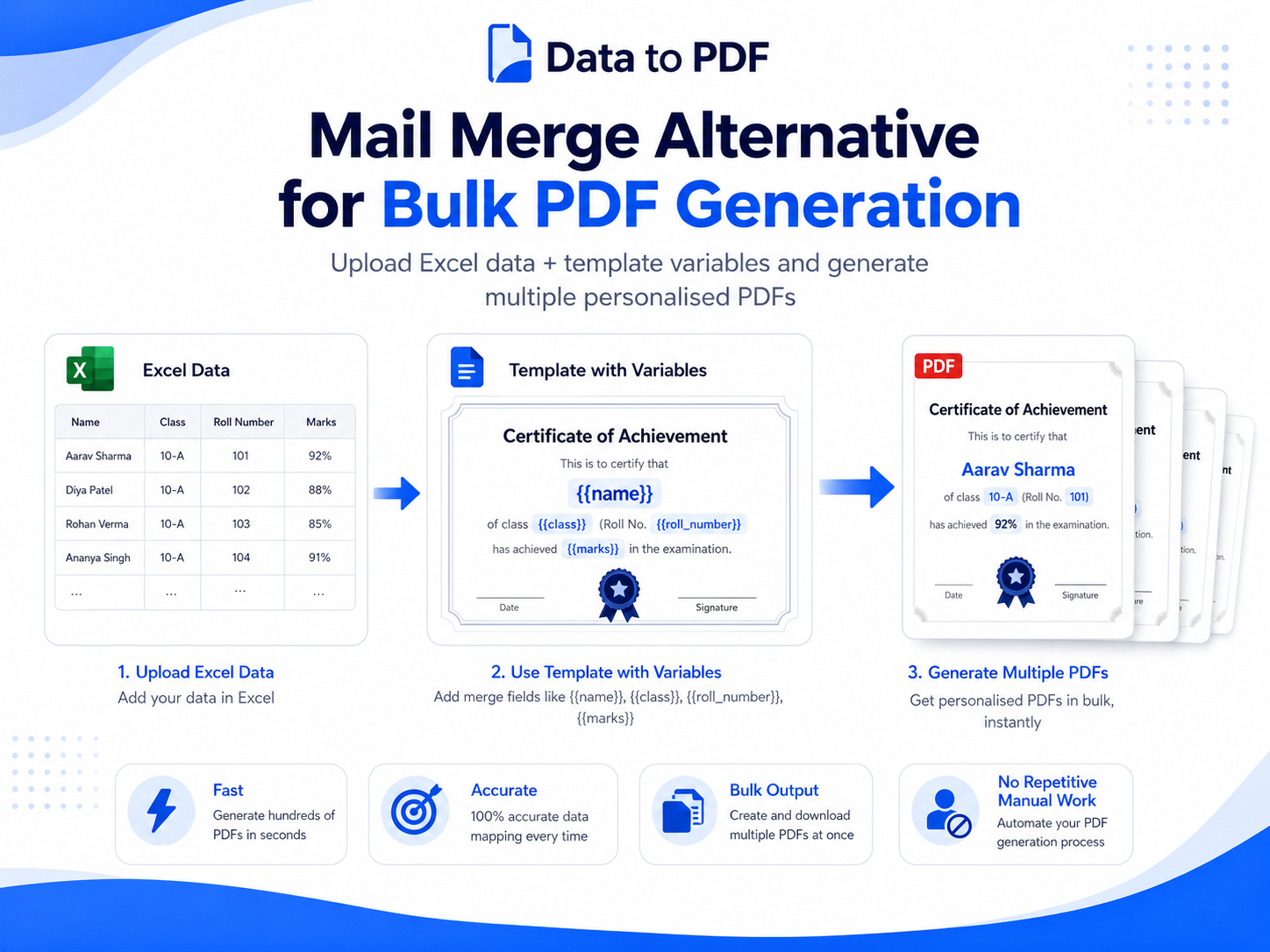
A good mail merge alternative is a tool that lets you upload an Excel or CSV file, upload a reusable Word or Excel template, and generate one personalised PDF for every row in your data. DataToPDF is built for this exact workflow.
Simple workflow
Excel / CSV Data + Template with Variables = Bulk Personalised PDFs
The problem
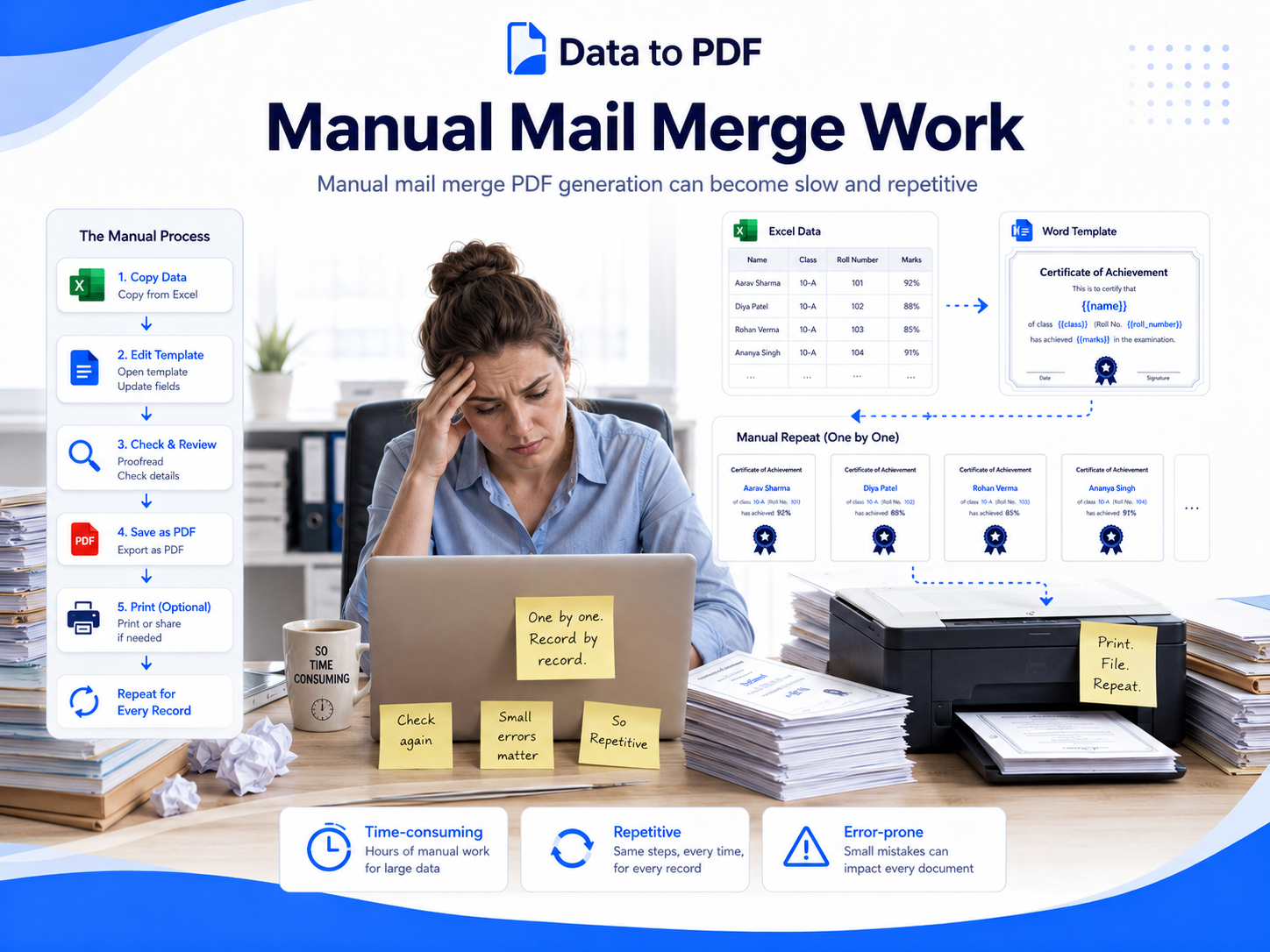
Mail merge becomes difficult when your final output needs to be separate PDFs
Word mail merge is often used for letters, labels and simple documents. But when a school, business or HR team needs hundreds of individual PDF files, the process can become confusing.
- • Creating one file per person takes extra effort.
- • Renaming files manually wastes time.
- • Small field-mapping mistakes can create wrong documents.
- • Repeating the same process every month or exam cycle is boring.
- • Non-technical users may not be comfortable with scripts or macros.
Comparison
Word mail merge vs DataToPDF
Mail merge is not wrong. It is simply not always the easiest option when you need bulk PDF generation with separate files, reusable templates and clean downloads.
| Feature | Word Mail Merge | DataToPDF |
|---|---|---|
| Setup | Requires Word mail merge setup and field mapping | Upload data file and template directly |
| Output | Often needs extra steps to create separate PDFs | Creates individual PDFs from each data row |
| File naming | Usually manual or needs extra scripts/macros | Use student name, roll number, invoice number or any field |
| Template type | Mostly Word-based | Works with Word and Excel templates |
| Best for | Letters and simple merged documents | Certificates, admit cards, invoices, receipts, slips and reports |
Step-by-step guide
How to generate bulk PDFs without mail merge
The process is simple: prepare your data, add variables in your template, upload both files and download your generated PDFs.
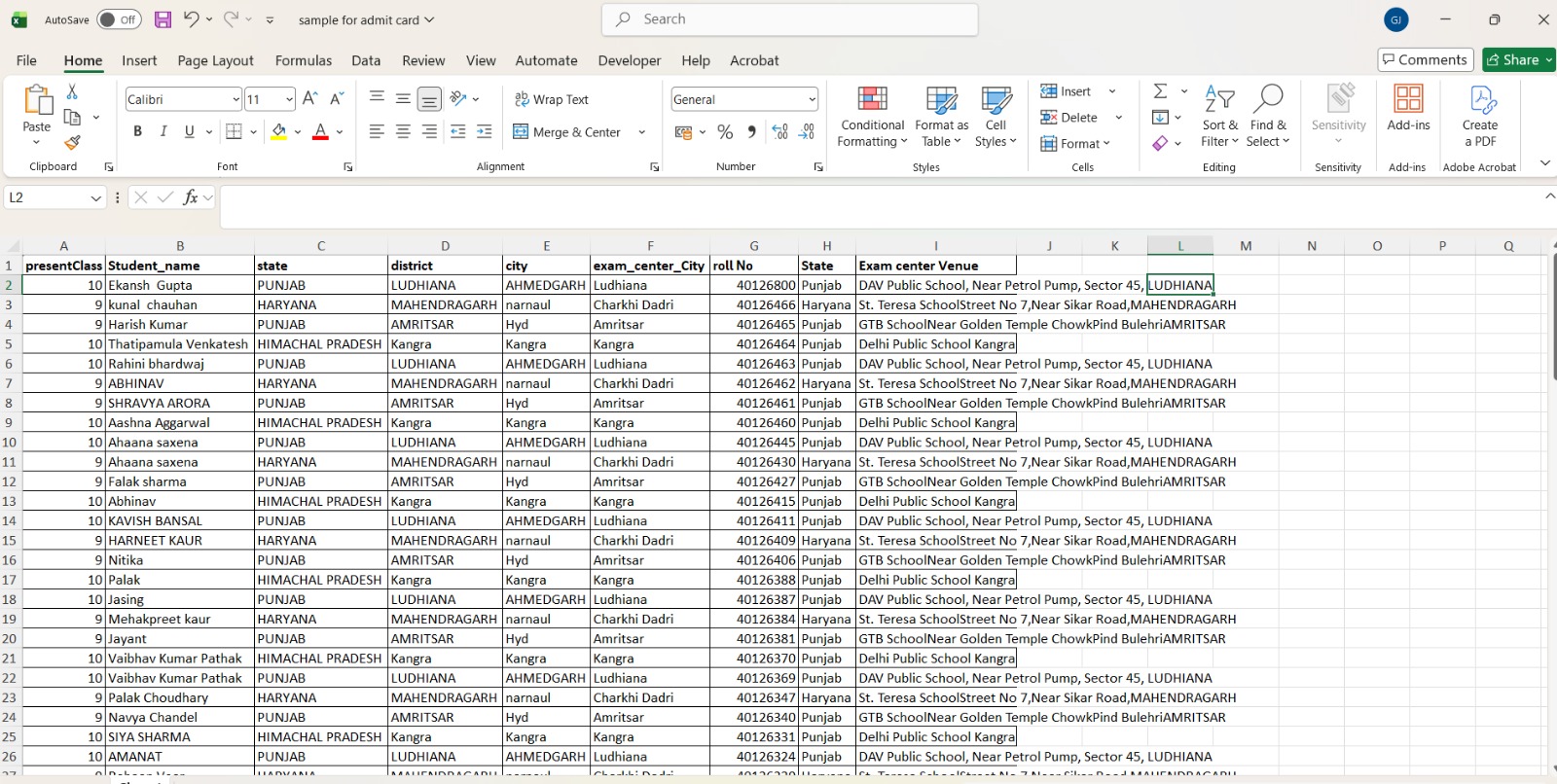
Prepare your Excel or CSV data
Create one row for every person, student, employee, customer or record. Keep the first row as clean column names.
Create a Word or Excel template
Add variables inside your template, such as {{name}}, {{class}}, {{roll_number}}, {{amount}} or {{invoice_number}}.
Upload both files to DataToPDF
Upload the data file and the template on DataToPDF. The tool reads your variables and prepares the PDF generation workflow.
Preview and generate PDFs
Check that the variables match your Excel columns. Then generate personalised PDF files in bulk.
Download all PDFs together
Download the generated PDFs in one ZIP file. Use meaningful file names based on your data columns.
Example variables you can use
Your Excel column names should match the variables inside your Word or Excel template.
{{name}}{{class}}{{roll_number}}{{exam_date}}{{invoice_number}}{{amount}}{{employee_id}}{{designation}}{{joining_date}}{{certificate_title}}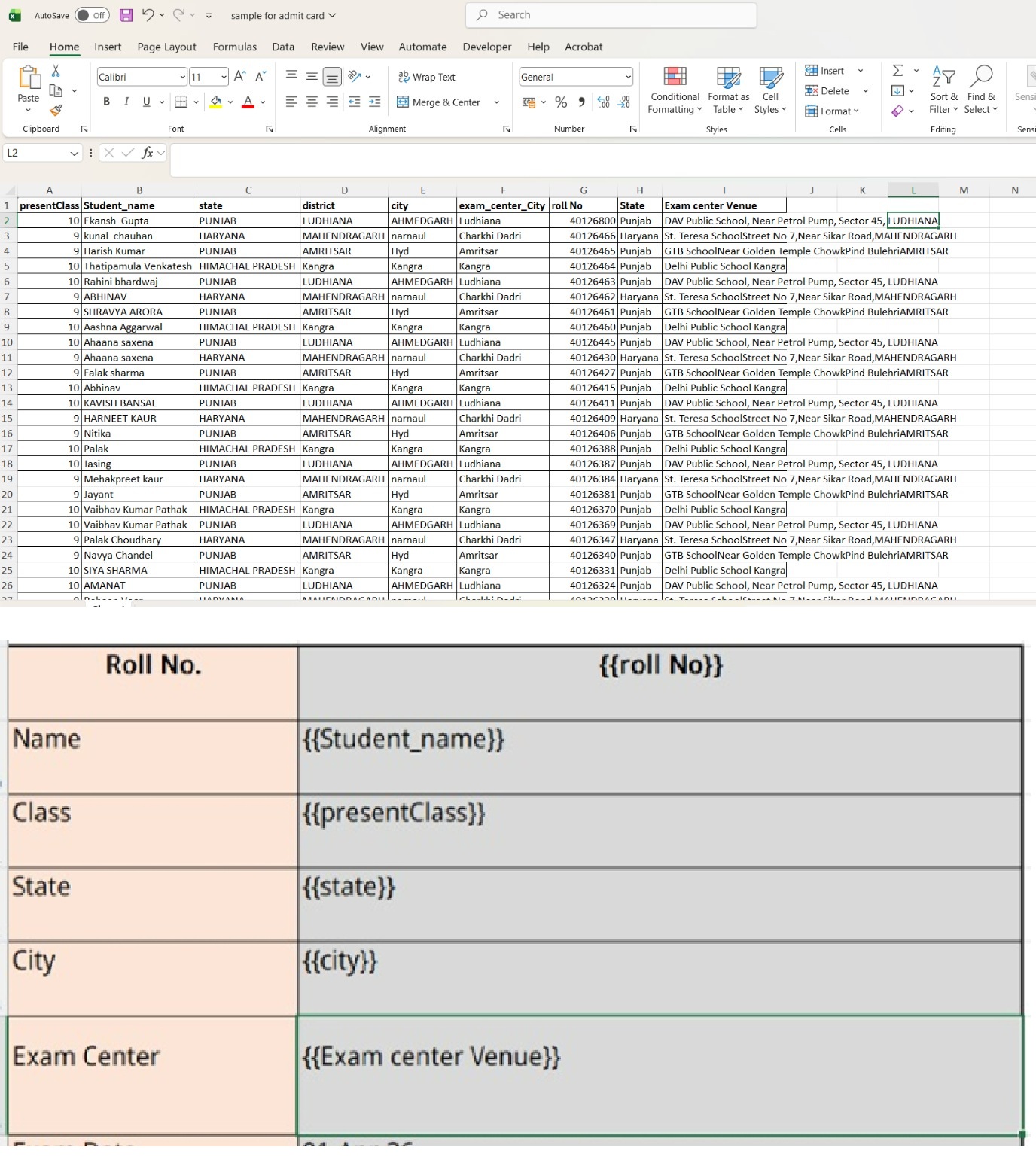
Template workflow
Use one template again and again
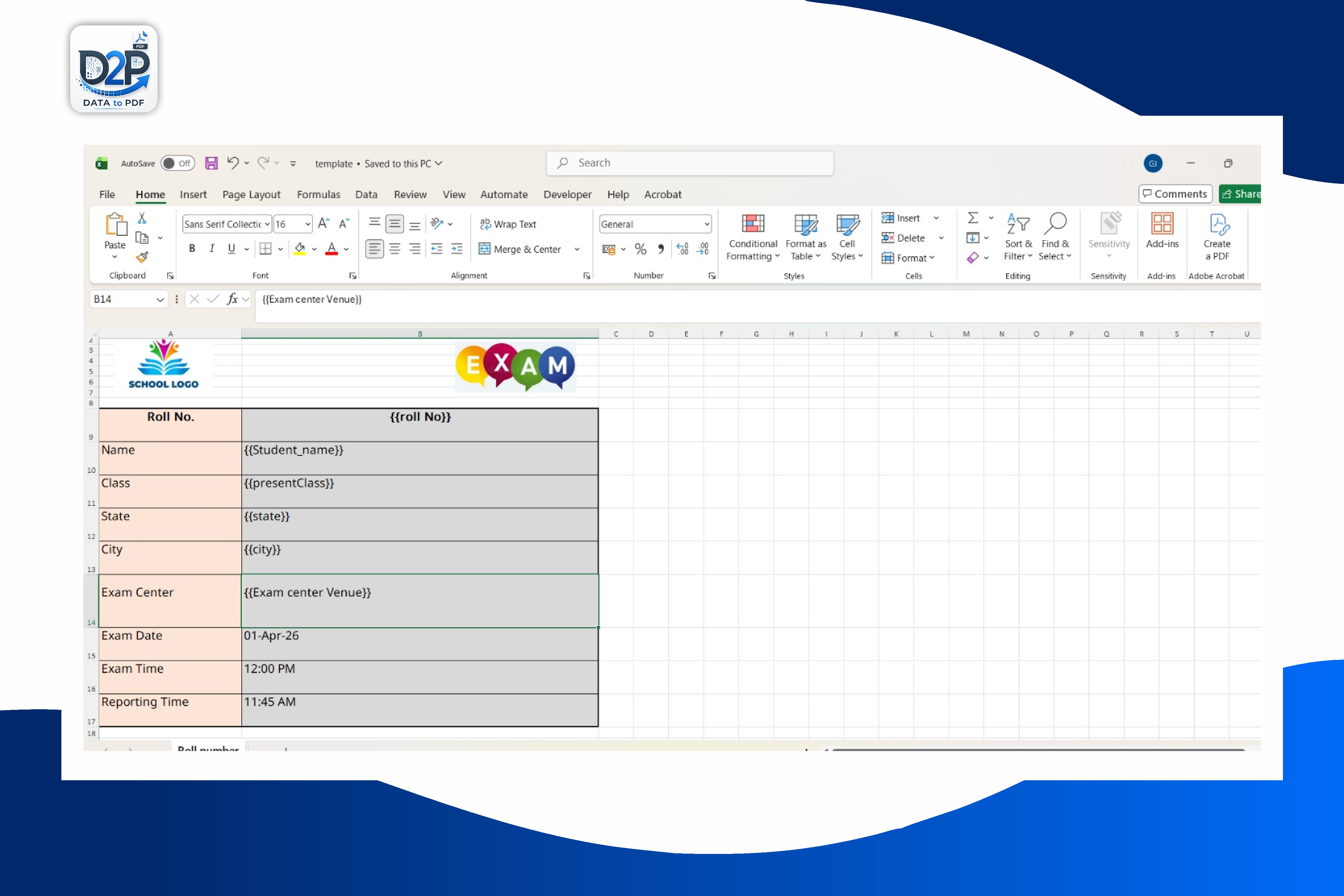
The biggest advantage of DataToPDF is that your design stays reusable. You can create one admit card template, one certificate template, one invoice template or one salary slip template and use it whenever new data is ready.
Use cases
What can you generate with this mail merge alternative?
Any repetitive document that follows the same layout but needs different personal details can be generated using this workflow.
Admit cards and hall tickets
Create individual admit cards for students using class, roll number, exam date and centre details.
Certificates
Generate participation, achievement, completion and training certificates from Excel data.
Report cards and marksheets
Create personalised student result PDFs with subject-wise marks, grades and remarks.
Salary slips
Generate employee salary slips using monthly payroll data from Excel.
Invoices
Create personalised invoice PDFs from prepared and verified billing data.
Fee payment receipts
Generate personalised fee receipt PDFs from prepared student payment data.
Appointment letters
Prepare appointment letters, offer letters and HR documents for multiple employees or candidates.
Benefits
Why teams use DataToPDF instead of manual mail merge
It is made for office users who already have data in Excel and simply want polished PDF documents without unnecessary steps.
No need to manually copy-paste names, roll numbers, amounts or dates.
Create one PDF per row from your Excel or CSV data.
Use your own Word or Excel template design.
Download all generated files together in a ZIP.
Reuse the same template again for future batches, months or exams.
Works for schools, coaching institutes, HR teams and small businesses.
Video tutorial
Watch how bulk PDF generation works
Add your YouTube tutorial here to show the complete workflow: upload data, upload template, generate PDFs and download the ZIP file.
FAQs
Mail merge alternative FAQs
What is the best alternative to mail merge for creating bulk PDFs?+
DataToPDF is a simple alternative when you want to generate individual PDFs from Excel or CSV data using Word or Excel templates. It is useful for admit cards, certificates, invoices, salary slips, receipts and other personalised documents.
Can I create separate PDF files from one Excel sheet?+
Yes. DataToPDF creates one PDF for each row in your Excel or CSV file. You can then download all generated PDFs together in a ZIP file.
Can I use my existing Word template?+
Yes. You can use a Word template with variables such as {{name}}, {{roll_number}}, {{amount}} or {{date}}. DataToPDF replaces those variables using your uploaded data.
Can I use an Excel template instead of Word?+
Yes. DataToPDF also supports Excel templates. This is useful if your admit card, invoice, salary slip or report card layout is already built in Excel.
Is DataToPDF better than Word mail merge?+
Mail merge is useful for letters and simple documents. DataToPDF is better when your main goal is to create separate personalised PDF files in bulk and download them together.
Do I need coding or macros?+
No. You do not need coding, VBA macros or scripts. You only need your Excel or CSV data and a template with matching variables.
Who can use this workflow?+
Schools, coaching institutes, colleges, HR teams, small businesses, finance teams and office administrators can use this workflow to reduce repetitive document work.
Related resources
Continue with related guides and templates
Fill an Existing Word Report Card for an Entire Class
Keep the approved Word design and match its changing student fields to prepared Excel columns.
Bulk Admit Card Generator from Excel
Generate personalised admit cards and hall tickets from Excel or CSV data.
How to Create 100 Admit Cards from Excel
A practical tutorial for schools, coaching institutes and exam teams.
Browse DataToPDF Templates
Find templates for certificates, admit cards, invoices, receipts and more.
DataToPDF Pricing
Check plans and credits for bulk PDF generation.
Better Mid-Term Result Presentation
Learn how schools can create clearer personalised report cards and improve result communication.
Prepare Salary Slip Data in Excel
Review payroll fields and variables before creating salary-slip documents.
Prepare Invoice Data in Excel
Structure invoice records and check totals before generating multiple PDFs.
Prepare Fee Payment Receipt Data
Organise reviewed student payment records for consistent receipt PDFs.
Prepare Certificate Data in Excel
Match approved recipient records with reusable certificate template variables.
Prepare School Document Batches from Excel
Control shared student fields across certificate, admit-card and result PDF batches.
Personalised PDF Batches for Print Shops
Plan client data handoff, proofs, filenames and pre-production review for repeatable designs.
Compare Desktop and Online Batch Speed
Evaluate upload, conversion, download and review time for the way your team actually works.
Final step
Ready to generate bulk PDFs without mail merge?
Upload your Excel or CSV data and your Word or Excel template. DataToPDF will generate personalised PDF files for every row.