Receipt errors affect parent trust
A wrong receipt number, amount, fee period or balance due can create confusion for parents and students.
Excel / CSV Fee Data → Student Receipt PDFs
Download a professional fee payment receipt template and generate student receipt PDFs from Excel or CSV. Add student details, parent details, fee particulars, payment mode, dues and balance, then create bulk fee receipts with DataToPDF.
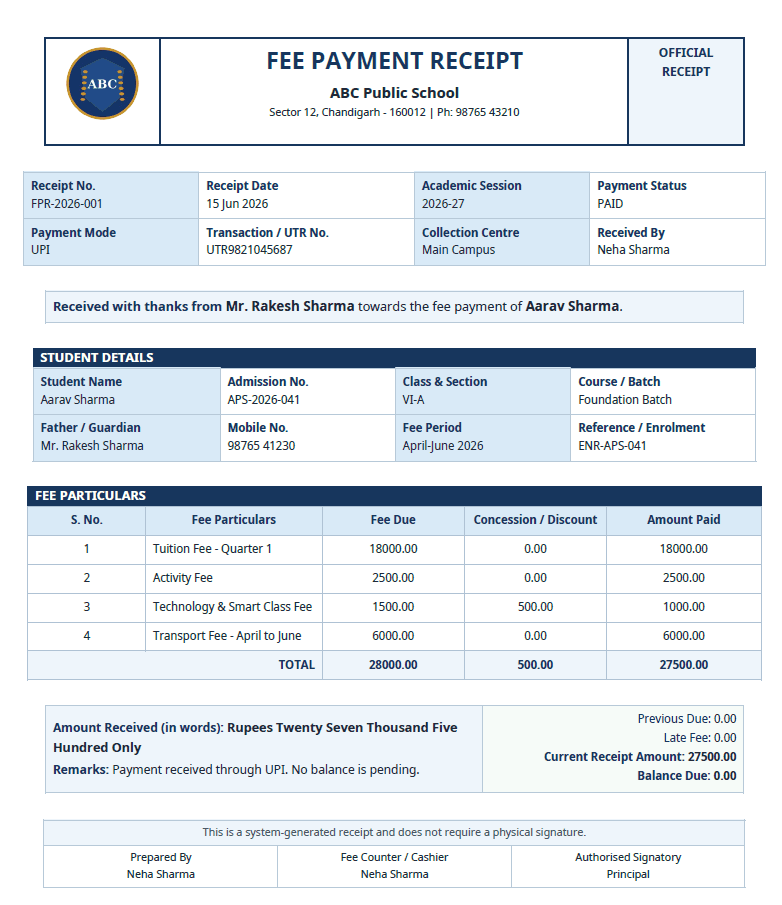
Verify the payment amount, payment date, receipt number, student details, payment mode and balance before upload. DataToPDF uses your prepared spreadsheet data and template to generate personalised receipt PDFs; it is not a payment gateway, accounting system, reconciliation tool, payment collector or school ERP.
Quick answer
Prepare an Excel or CSV file with one row per receipt. Add receipt number, student details, parent details, fee particulars, payment mode, amount paid and balance due. Then use a receipt template with variables like {{Receipt_No}}, {{Student_Name}}, {{Paid_Total}} and {{Balance_Due}}. DataToPDF replaces the variables and creates individual PDF fee receipts.
The problem
Schools and institutes collect payments from many students every day. If the accounts or admin team still creates receipts one by one, the work becomes repetitive, slow and error-prone.
A wrong receipt number, amount, fee period or balance due can create confusion for parents and students.
Admin teams spend hours copying student details, payment details and fee particulars into receipt formats.
A clean official receipt with proper fee breakup, dues and signatory area makes the institute look organised and reliable.
Manual method
Manual receipt creation usually means maintaining payment data in Excel, then editing a receipt format separately for every student payment.
Better solution
DataToPDF lets you keep all fee collection data in Excel and all receipt design in one template. It combines both files and creates one fee receipt PDF for every row.
One receipt row = one personalised fee receipt PDF.
Use student details, fee particulars, amount paid and balance due.
Keep your school logo, receipt format and signatory area.
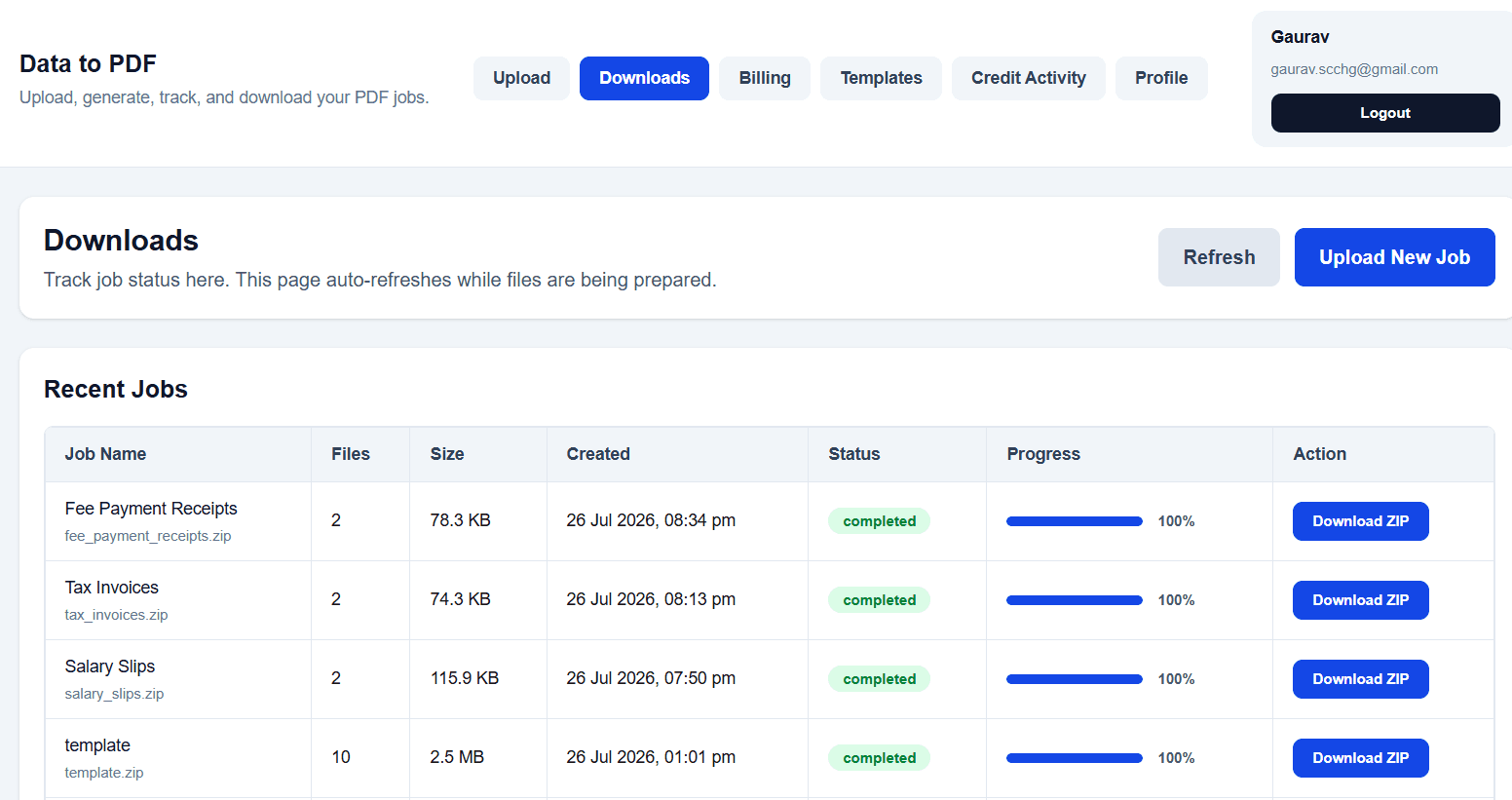
Download all fee receipt PDFs together in one ZIP file.
Step-by-step guide
Use this workflow whenever you need to create multiple student fee receipt PDFs from payment data without repeating manual formatting work.
Create one row for each receipt. Add receipt number, receipt date, student details, parent details, fee particulars, amount paid, dues and payment reference.

Download the receipt template and keep variables such as {{Receipt_No}}, {{Student_Name}}, {{Parent_Name}}, {{Paid_Total}}, {{Balance_Due}} and {{Amount_In_Words}}.
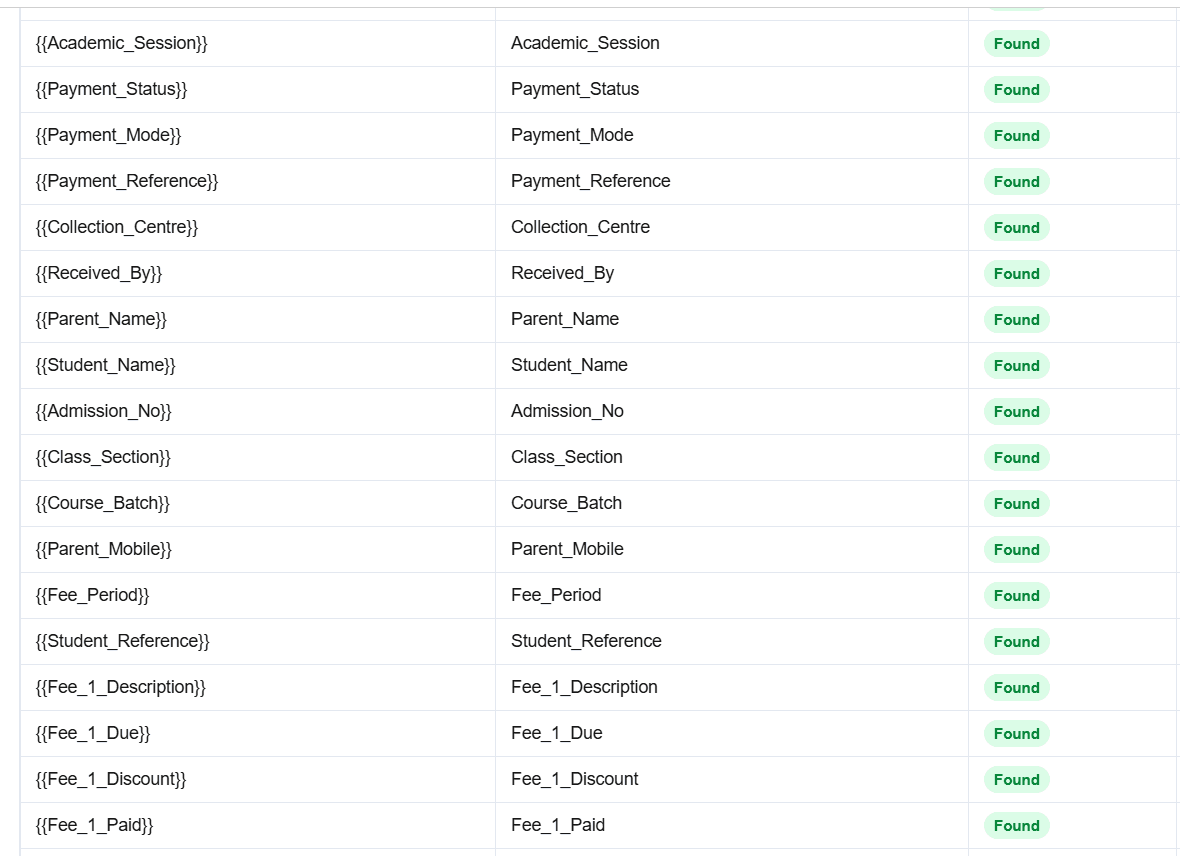
Upload your Excel or CSV fee collection data and your fee receipt template to DataToPDF.
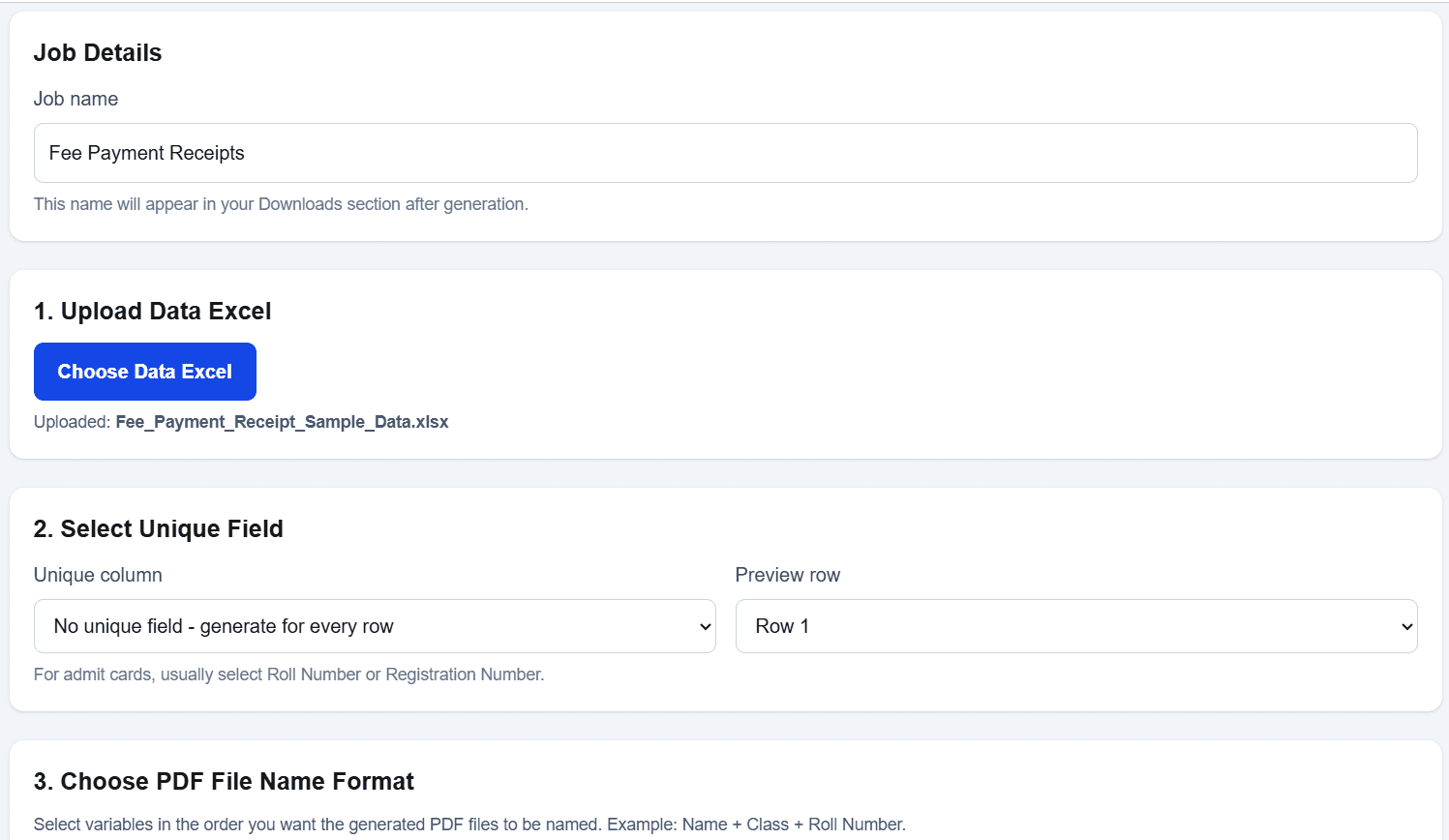
DataToPDF matches your Excel columns with the template variables and creates one receipt PDF for every row.
Download all generated fee receipts together in one ZIP file. You can name files using receipt number, student name, admission number or fee period.
Downloadable template
The template format includes school details, official receipt label, receipt number, payment mode, transaction details, student details, fee particulars, total paid, balance due, remarks and signatory space.
School_NameSchool_AddressSchool_PhoneReceipt_NoReceipt_DateAcademic_SessionPayment_StatusPayment_ModePayment_ReferenceCollection_CentreReceived_ByParent_NameStudent_NameAdmission_NoClass_SectionCourse_BatchParent_MobileFee_PeriodStudent_ReferenceFee_1_DescriptionFee_1_DueFee_1_DiscountFee_1_PaidFee_2_DescriptionFee_2_DueFee_2_DiscountFee_2_PaidFee_3_DescriptionFee_3_DueFee_3_DiscountFee_3_PaidFee_4_DescriptionFee_4_DueFee_4_DiscountFee_4_PaidTotal_Fee_DueTotal_DiscountPaid_TotalAmount_In_WordsRemarksPrevious_DueLate_FeeBalance_DuePrepared_ByAuthorised_Signatory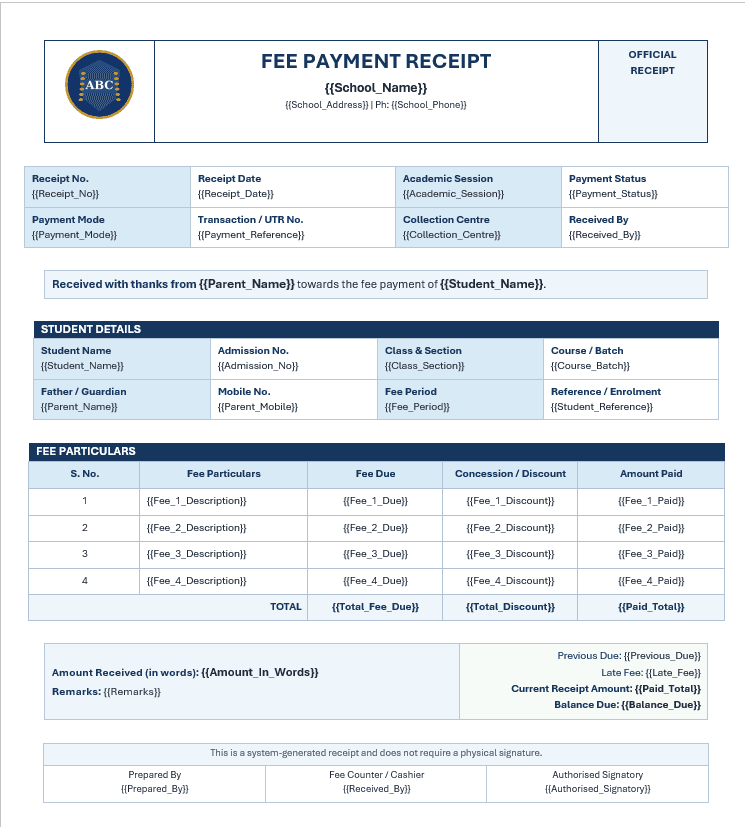
Template sections
The format is designed to look official, clean and easy for parents, students and accounts teams to understand.
Use cases
Any school, institute or office that maintains fee payment data in Excel can use this page to download the template and create professional receipt PDFs.
Generate student fee payment receipts for tuition fee, admission fee, transport fee, annual charges and exam fee.
Create receipt PDFs for course fee, batch fee, test-series fee, counselling fee and instalment payments.
Prepare official fee receipts for academic sessions, semester fee, hostel fee and other student payments.
Generate monthly fee receipts for students without manually editing receipt formats again and again.
Use Excel fee collection data to prepare clean PDF receipts for record keeping and parent communication.
Create receipt PDFs for different branches, collection centres and payment modes in one organised workflow.
Benefits
The goal is simple: keep your fee collection data in Excel, keep your receipt format reusable, and reduce manual receipt creation work.
Create one fee receipt PDF for every row in your Excel file.
Avoid manually typing receipt numbers, student names and payment details.
Use a professional receipt format with school or institute branding.
Include fee particulars, discounts, dues, paid amount and balance due.
Download all fee receipts together in one ZIP file.
Reuse the same template for every academic session, month or fee cycle.
Visit the DataToPDF YouTube channel for product walkthroughs and bulk PDF generation guidance.
Frequently asked questions
Yes. You can upload an Excel or CSV file with student fee payment data and use a receipt template with matching variables. DataToPDF creates one fee receipt PDF for every row.
Yes. If your Excel file has 100 receipt rows, DataToPDF can create 100 separate fee receipt PDFs in one go.
Yes. This page includes a downloadable fee payment receipt template and a sample Excel data file that you can edit and use.
Yes. You can include payment mode, transaction number, UTR number, collection centre and received-by details in the receipt.
Yes. The template supports fee particulars, fee due, concession or discount, amount paid, previous due, late fee and balance due.
Yes. You can use your own Word or Excel receipt template. Just place variables such as {{Student_Name}}, {{Receipt_No}} and {{Paid_Total}} wherever you want the data to appear.
Yes. DataToPDF creates one separate PDF file for each row and lets you download all files together in a ZIP.
Schools, coaching institutes, colleges, tuition centres, accounts teams and admin offices can use this workflow to generate fee receipt PDFs from Excel.
Related resources
Organise verified student and payment details before generating receipt PDFs.
Generate professional invoice PDFs from Excel or CSV using a reusable tax invoice template.
Create employee salary-slip PDFs from prepared and verified payroll data.
Create personalised admit cards and hall tickets from student data.
Learn how to create separate PDFs from Excel without complex mail merge steps.
Ready to save fee-counter time?
Upload your fee collection data and receipt template. DataToPDF will create personalised receipt PDFs for every student payment.