Mid-Term Exams Coming? Present Results Better
A Better Result System for Mid-Term Exams
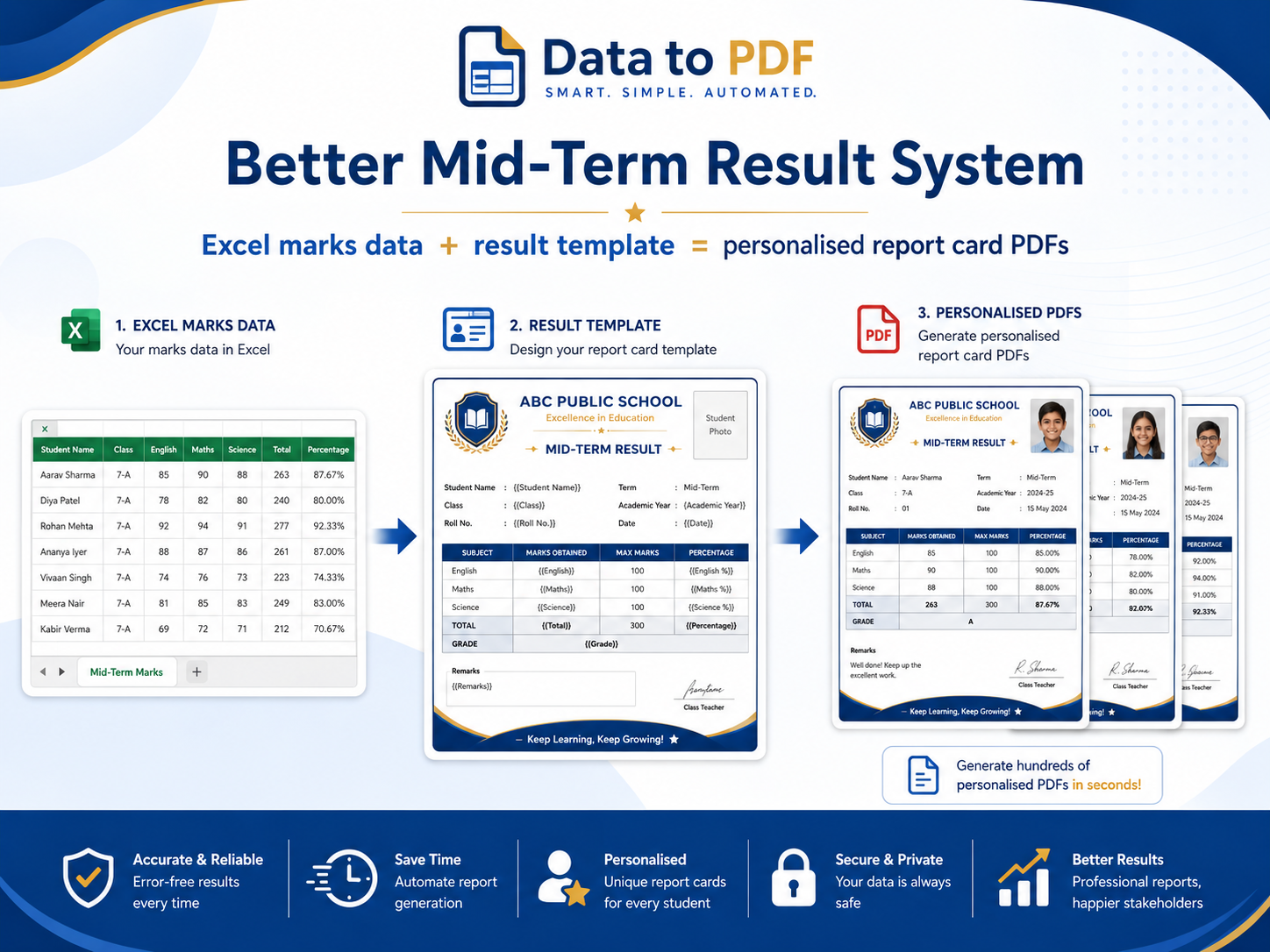
Mid-term results are a big moment for students, parents, teachers and coaching teams. A clean, personalised result PDF does more than show marks. It helps students understand their progress, improves parent confidence and makes your institute look more organised.
Quick answer
How can better result presentation improve student satisfaction?
Students and parents feel more satisfied when results are easy to understand, visually clean and useful for improvement. A good result PDF should not only show marks. It should clearly show the student’s performance, strengths, weak areas and the next steps before final exams.
Simple result system formula
Clean Marks Data + Useful Result Template + Personalised PDF Presentation = Better Result Experience
The problem
Manual result making affects more than teacher workload
In many schools, teachers still prepare report cards manually after mid-term exams. This takes a lot of time and increases the chance of mistakes in names, marks, totals, grades or remarks. For parents, the report card is not just a document. It reflects the school’s seriousness, accuracy and professionalism.
When result cards look manually prepared or contain avoidable errors, the school may appear technologically weak. A clean, personalised and error-controlled result PDF helps the school look more organised, modern and trustworthy.
Students and parents feel more satisfied when results are easy to understand, visually clean and useful for improvement. A good result PDF should not only show marks. It should clearly show the student’s performance, strengths, weak areas and the next steps before final exams.
It also protects the school’s image. When every student gets a properly formatted result card with accurate details, parents feel that the school has a reliable system. This matters more during result season because one visible mistake can reduce parent confidence.
Teachers lose hours making results manually
During mid-term exams, teachers often have to prepare individual result cards one by one. This consumes a lot of time that could be used for checking performance, planning improvement and speaking with students.
Small result mistakes can hurt school reputation
A spelling mistake, wrong mark, incorrect total or missing remark may look small, but parents see the final report card as the school’s official communication. Errors in result cards can make the school look careless.
Manual result systems look technologically weak
When results are shared as rough Excel sheets, screenshots or manually edited files, parents may feel the school is not using modern systems. A clean personalised PDF result card presents the school as more organised and professional.
Result experience
A better result card answers more than “How many marks?”
During mid-term exams, students are still in improvement mode. This is the right time to show them what is working, where they are losing marks and what they should focus on next.
A professional result PDF can make the same marks feel more useful because the information is structured, personalised and easy to discuss with parents or teachers.
Create Better Report Cards →What a good mid-term result PDF should include
Practical workflow
How to build a better mid-term result system
You do not need to build a complicated software system. Start with your existing Excel marks data and turn it into clean, personalised result PDFs.
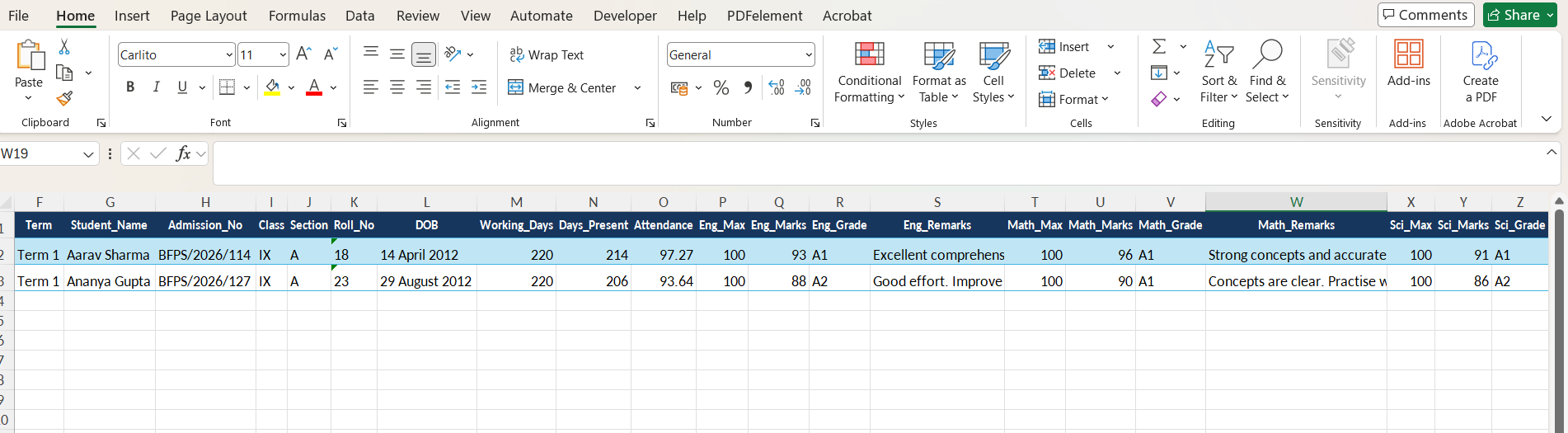
Collect marks in Excel
Keep all student marks in one Excel or CSV file. Add columns for student name, class, section, roll number, subject marks, total, percentage and remarks.
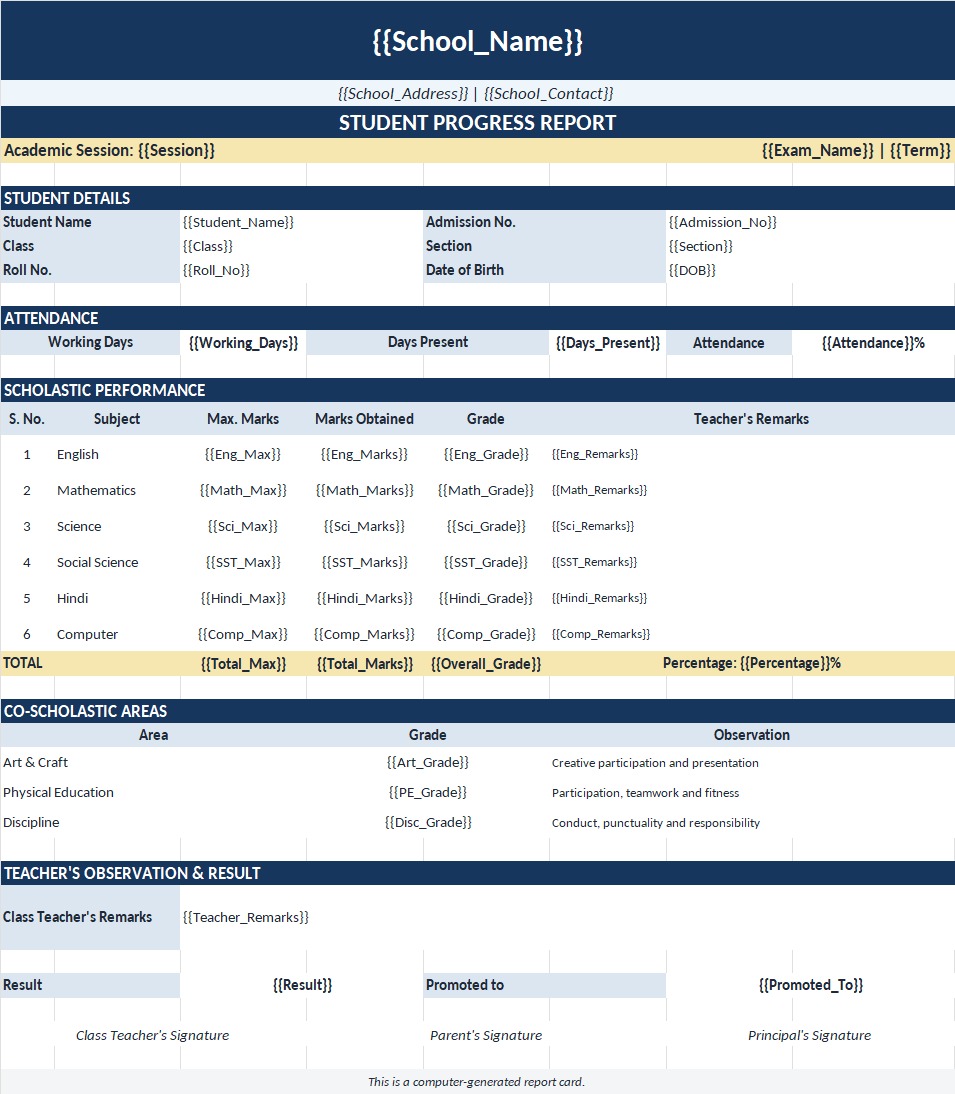
Create a clean result template
Design a report card or result summary in Excel or Word. Add variables such as {{student_name}}, {{class}}, {{maths}}, {{science}}, {{percentage}} and {{teacher_remarks}}.
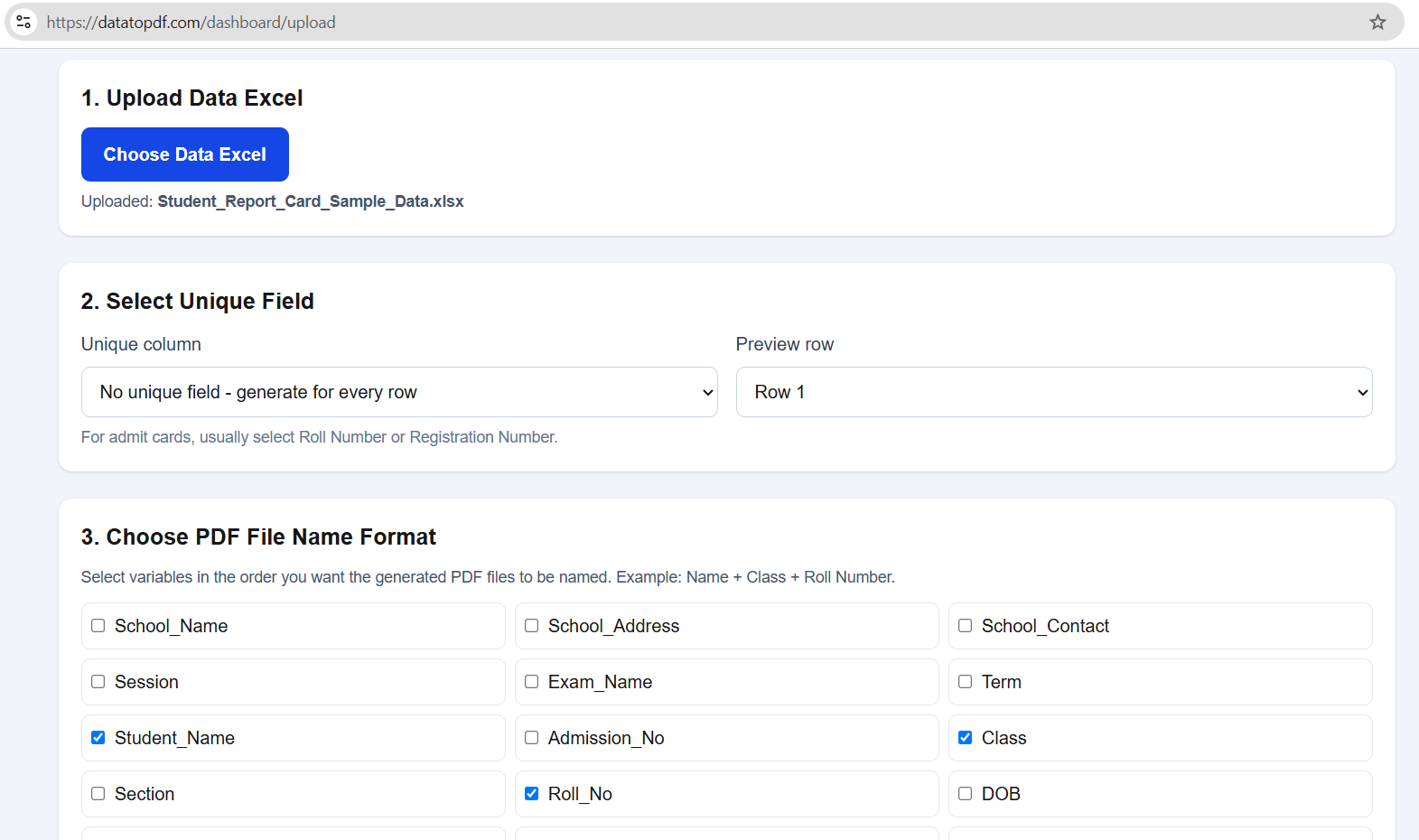
Generate personalised result PDFs
Upload your result data and template to DataToPDF. Generate one personalised PDF result card for each student.
Share results professionally
Download all result PDFs in one ZIP file. Share them with students, parents or class teachers in a clean and organised format.
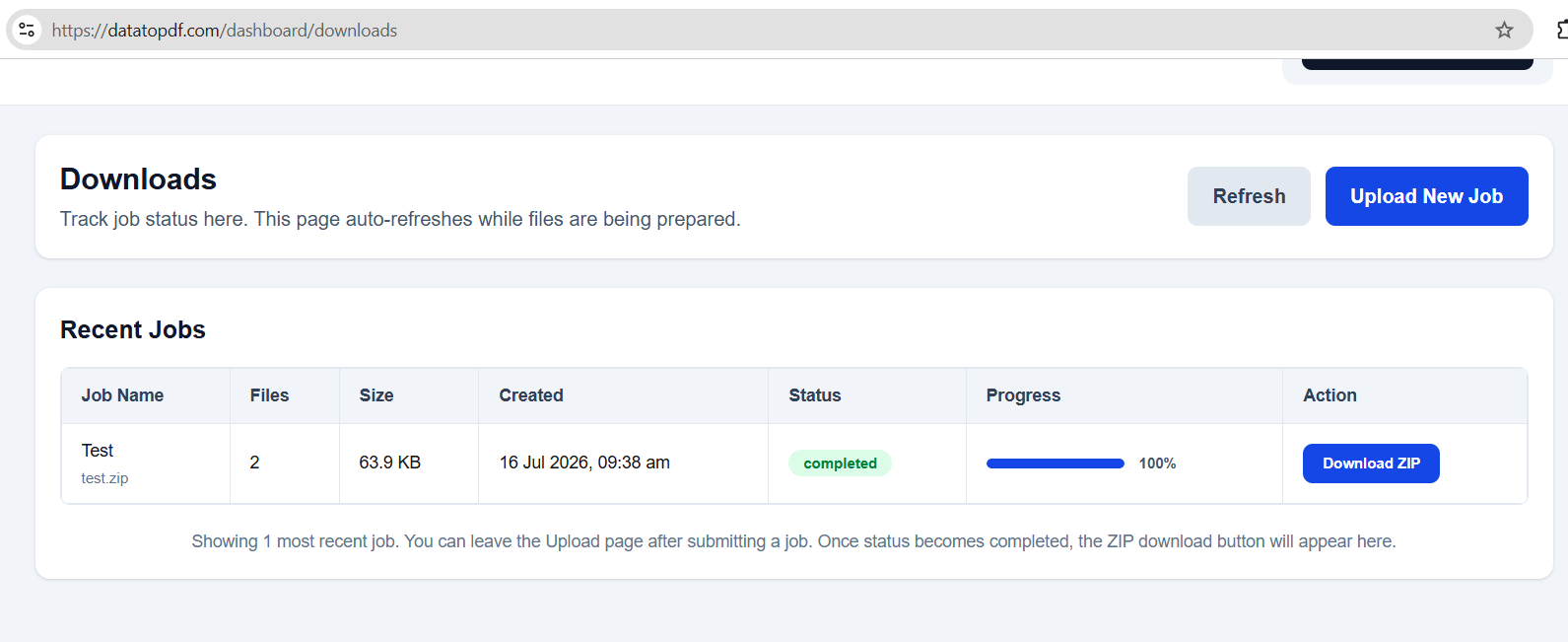
DataToPDF solution
Turn Excel marks into personalised result PDFs
DataToPDF helps schools, coaching institutes and admin teams generate personalised PDFs from Excel or CSV data. You keep your marks in Excel, create a reusable result template, and generate one result PDF for every student.
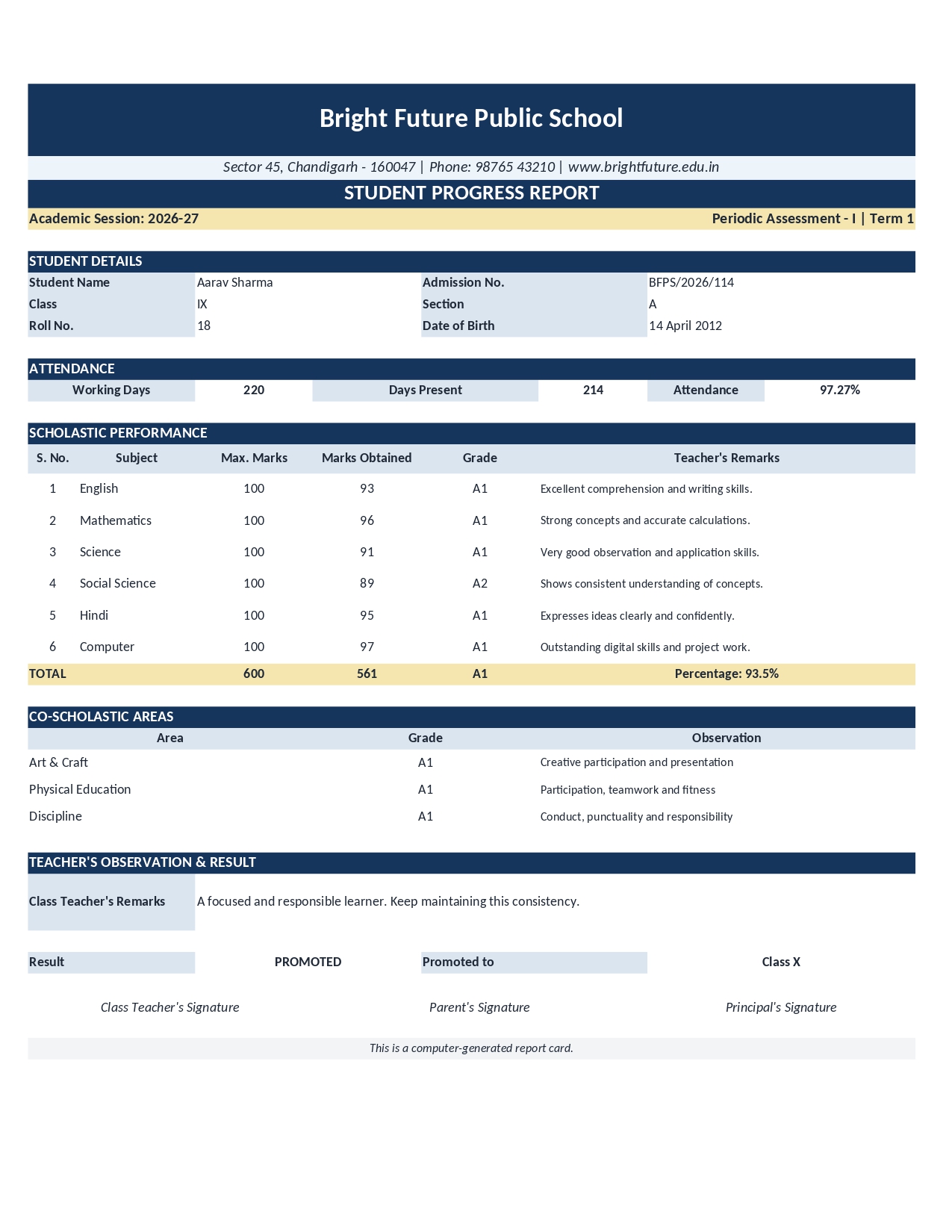
Benefits
Why better result presentation helps satisfaction
A better result system does not mean adding decoration. It means presenting marks in a way that is clear, useful and confidence-building.
Students understand their performance better
A clean result PDF can show marks, percentage, grade and remarks in one place. This helps students see where they stand.
Parents feel the institute is organised
Professional report cards show that the school or coaching institute is serious about tracking student progress.
The school looks more modern and reliable
A clean digital result system shows parents that the school is organised, technology-friendly and serious about accurate communication.
Teachers save time during result season
Instead of making individual report cards manually, teams can work from one Excel sheet and one reusable template.
Mid-term feedback becomes more useful
Mid-term exams are not only for marks. They are a chance to correct direction before final exams.
The same format can be reused
Once your result template is ready, you can reuse it for unit tests, mid-term exams, mock tests and final results.
Less copy-paste, fewer mistakes
Using data directly from Excel reduces manual typing errors in names, marks, totals and remarks.
Use cases
Who can use this result system?
Any team that keeps student marks in Excel can use this workflow to create cleaner result cards and progress reports.
Schools
Create class-wise mid-term report cards, progress reports and parent-meeting result summaries.
Coaching Institutes
Generate test-series result PDFs, batch-wise performance reports and mock-test scorecards.
Colleges
Prepare internal assessment reports, semester progress cards and subject-wise marksheets.
Competitive Exam Centres
Share student performance reports for NEET, JEE, Olympiad and scholarship test preparation.
Video tutorial
Watch how to generate result PDFs from Excel
Add your YouTube tutorial here to show schools and coaching institutes how to upload marks data, upload the template and download personalised result PDFs.
FAQs
Mid-term result system FAQs
Why does result presentation matter during mid-term exams?+
Mid-term results are not only about marks. A clear result presentation helps students and parents understand performance, weak areas and next steps before final exams.
Can better report cards improve student satisfaction?+
Better report cards can improve the way students and parents experience results because the information becomes easier to understand, more organised and more useful for improvement.
Can I create mid-term report cards from Excel?+
Yes. You can keep marks in Excel or CSV, create a report card template with variables, and use DataToPDF to generate personalised PDF report cards in bulk.
What should a good mid-term result PDF include?+
A good mid-term result PDF should include student details, exam name, subject-wise marks, total marks, percentage, grade, teacher remarks and improvement suggestions.
Is this useful for coaching institutes?+
Yes. Coaching institutes can use this workflow for mock tests, weekly tests, mid-term assessments, batch reports and test-series performance reports.
Can I generate separate PDFs for each student?+
Yes. DataToPDF creates one PDF for each row in your Excel or CSV file and lets you download all generated PDFs together in a ZIP.
Do I need coding or mail merge?+
No. You only need your Excel or CSV data and a Word or Excel template with matching variables.
Related resources
Continue with result and PDF generation resources
Create Certificates in Bulk from Excel
Prepare approved school achievement and participation certificate records for bulk PDF generation.
How Schools Can Prepare Fee Payment Receipt Data in Excel
A practical guide to organising reviewed student payment records for consistent receipt PDFs.
Report Card Generator from Excel
Generate personalised student report cards and marksheets from Excel or CSV data.
Mail Merge Alternative for Bulk PDF Generation
Learn how to generate separate PDF files from Excel without complex mail merge steps.
Bulk Admit Card Generator from Excel
Create personalised admit cards and hall tickets from student data.
Browse DataToPDF Templates
Find templates for report cards, admit cards, certificates, receipts and more.
How to Create 100 Admit Cards from Excel
Follow a practical workflow for generating personalised admit cards from student data.
Final CTA
Make your mid-term result presentation better
Upload your marks data and result template. DataToPDF will generate personalised PDF result cards for every student.